Also, just to be clear. I can not even evaluate n8n without being able to connect to my RDS databases (Postgres and MS SQLServer). Simply put, this makes n8n unusable for my company. (I know, I might be able to evaluate with docker, but I want it hosted on your cloud and I do not want to bother with docker if I won’t be able to deploy to your cloud)
Hey @tpak,
It still needs an internal review, I will see if I can find someone to do it today so we can have it in the next release. If you just wanted to test it you could do it in Docker or locally from the branch anytime then you would know if it would work in Cloud when the release happens. Typically cloud also doesn’t get the release at the same time as npm / docker so it might be another week after the release until it is available there.
Hi,
I am having the same issue, self hosted installation, trying to connect to MSSQL which has CA.
Gets this error
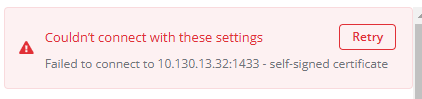
I have the certificate on files but don’t where to upload it to.
Any updates on this?
Still getting the same error.
n8n 1.83.2
I’m getting the same self-signed cert error while trying to connect to an Azure-hosted MSSQL server from a local self-hosted install. Trying to test and get familiar with n8n for the first time, and seeing the potential, but feeling stuck.
By contrast, I can connect just fine through MSSMS to the Azure SQL server with the exact same connection details and credentials from the same machine.
Has there been any progress on a definite solution (or even work-around) here that I have missed in my searching? Thank you!
In case this can help anyone else, I went pretty far down this rabbit hole for my own needs. There were multiple factors that might affect others as well.
One factor that was NOT obvious and one that I only found by testing connections through tedious directly was that using both an instance name AND a custom port in the Credentials configuration will cause a connect error even when they are both correct. However, the UI in the Credential config only shows “Login Failed for user…” - it (maybe?) doesn’t pass the raw tedious error back which is something like “Named instance and custom port number are mutually exclusive.” I had to remove the Named Instance and leave the configuration Database field BLANK when using a custom port number.
This might be a critical thing to note and highlight in the Doc for the MSSQL Server credential configuration, because I don’t think any errors expose that problem and everything can be correct including username/password and still NOT work because of that issue.
Additional feedback: It’s also very confusing that the instance name goes in the “database” field 
I went through all kinds of tests with the self-signed cert issue, including manually including the certs in a crt file configuration option testing directly in tedious with the option explicitly defined like this:
ca: fs.readFileSync("certfile.crt")
In the end, I discovered that my self-signed certificate issue was - at its root - actually a SAN issue. E.g. Hostname/IP does not match certificate’s altnames. This can happen when a SaaS provider uses their cert on something like Azure but has not included the Azure server name(s) in it’s cert SANs. Node / tedious rejects that for obvious reasons, but that issue might be more common than it should be.
I worked around it (for now) by modifying n8n on my local self-hosted install. I plan to make a quick custom node for this, and this is NOT okay for production, and use at your own risk etc. etc. But if this option had already been clearly documented in this thread it would have saved me hours. Again - ONLY DO THIS if you know exactly what you are doing.
In:
node_modules\n8n\node_modules\n8n-nodes-base\dist\nodes\Microsoft\Sql\GenericFunctions.js
I modified the options inside the const config inside the function configurePool.
This is their default:
options: {
		encrypt: credentials.tls,
		enableArithAbort: false,
		tdsVersion: credentials.tdsVersion,
		trustServerCertificate: credentials.allowUnauthorizedCerts
    }
Here are my changes:
options: {
		// override for local testing with self-signed cert issue
		// !!!!!!! --- NOT IDEAL --- USE AT OWN RISK --- !!!!!!!
		encrypt: true,
		enableArithAbort: false,
		tdsVersion: credentials.tdsVersion,
		trustServerCertificate: true
    }
Those mods allowed tedious to bypass the self-signed cert issue on my local self-hosted dev machine and I can now successfully use the MSSQL Credentials and Node.
Obviously, this approach will get whacked on any n8n updates, and is only suggested for very crude testing / prototyping / troubleshooting.
Idea / Feature request: Maybe a configuration option or additional setting(s) could be surfaced in the Credentials configuration to provide more control on this in the UI rather than in code with all the necessary warnings / etc. Pretty please 