Turn a GitHub Knowledge Base into a Telegram RAG Bot with Qwen via OpenRouter
I’m excited to share this workflow with the community! 
 Download this workflow for free on n8n.io: Turn a GitHub knowledge base into a Telegram RAG bot with Qwen via OpenRouter | n8n workflow template
What It Does
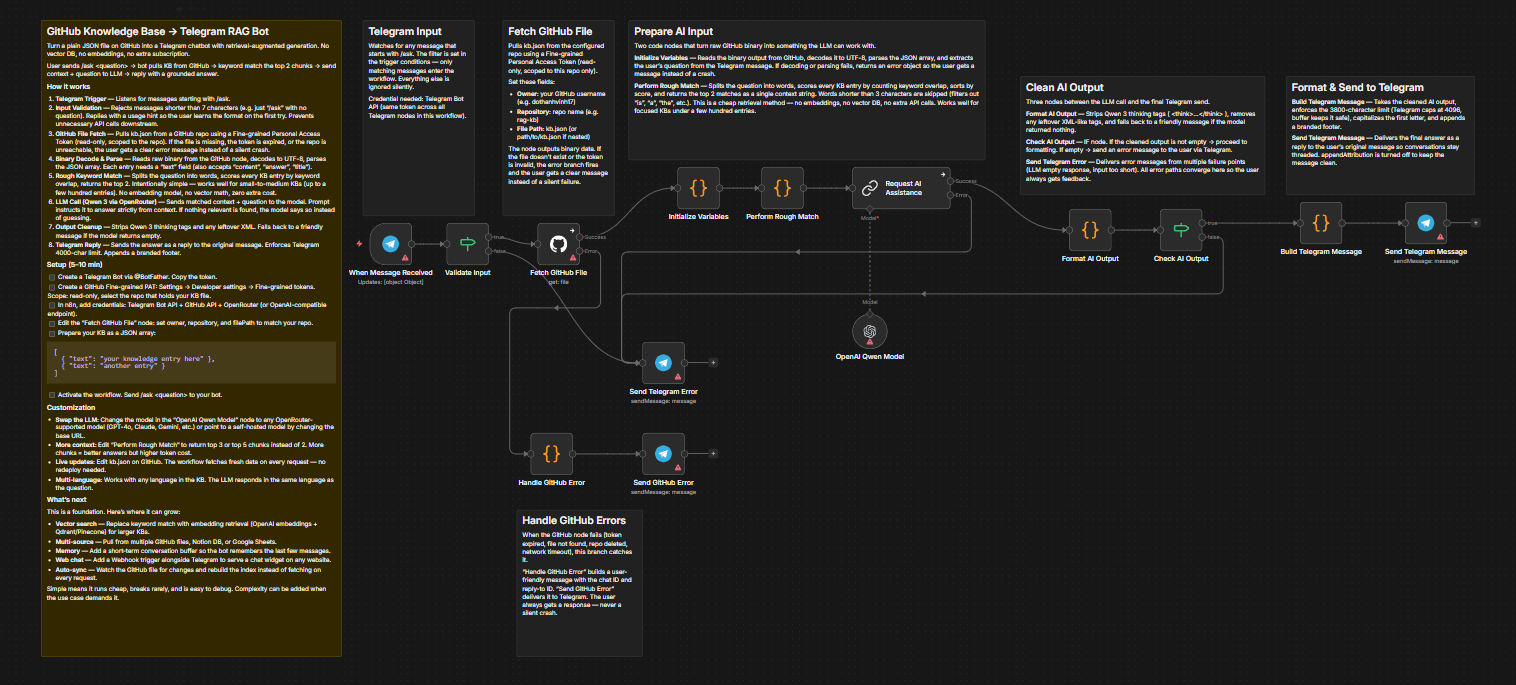
This workflow turns a plain JSON file sitting in a GitHub repository into a fully functional Telegram chatbot with retrieval-augmented generation (RAG) — no Pinecone, no Qdrant, no vector database, no extra subscription.
A user sends /ask <question> to your Telegram bot. The workflow pulls the knowledge base from GitHub, runs a local keyword-matching engine to find the most relevant chunks, feeds them as context to a Qwen 3 model via OpenRouter, and sends the answer back as a reply to the original message.
How It Works
-
Telegram Trigger — Listens for messages starting with
/ask. Anything shorter than 7 characters is rejected with an error message explaining the correct format. -
Input Validation — If a user sends just
/askwithout a question, or sends a message shorter than 7 characters, the workflow catches it immediately and replies with a clear instruction: “Please use: /ask ”. This prevents unnecessary API calls to GitHub and the LLM, and teaches the user the correct format on the first try. -
GitHub File Fetch — Pulls a JSON file from a GitHub repository using a Personal Access Token. If the file doesn’t exist or the token is invalid, the user gets a specific error message instead of a silent failure or a generic n8n error.
-
Binary Decode & Parse — Reads the raw binary output from the GitHub node, decodes it to UTF-8, and parses the JSON array. Each entry is expected to have a
"text"field (other field names like"content","answer","title"also work). -
Rough Keyword Match — Splits the user’s question into individual words, scores every knowledge base entry by counting how many words appear in it, and picks the top 2 matches. No embeddings, no vector math, no external API calls for retrieval. Works well for small-to-medium knowledge bases (up to a few hundred entries).
-
LLM Call (Qwen 3 via OpenRouter) — Sends the matched context and the original question to Qwen 3 235B through OpenRouter. The prompt instructs the model to answer strictly from the provided context. If the context doesn’t contain relevant information, the model says so instead of hallucinating.
-
Output Formatting — Strips any thinking tags from the model response, capitalizes the first letter, enforces Telegram’s 4000-character limit, and appends a branded footer.
-
Telegram Reply — Sends the formatted answer as a reply to the user’s original message, so conversations stay threaded.
Why This Approach
Most RAG setups require a vector database, an embedding model, and ongoing infrastructure costs. This workflow skips all of that. The trade-off is precision — keyword matching won’t catch semantic synonyms the way vector search does. But for knowledge bases focused on a specific topic (FAQ, product info, internal docs, local business info), keyword overlap is surprisingly effective and the setup cost is zero.
The LLM handles the fuzzy part. Even if the keyword match pulls in slightly noisy context, the model can usually extract the right answer. This division of labor — simple retrieval plus smart generation — keeps the workflow fast, cheap, and easy to maintain.
Setup (5–10 minutes)
-
Create a GitHub Fine-grained Personal Access Token with read access to the repository containing your knowledge base file.
-
Add the GitHub credential in n8n and configure the “get gh file” node with your repository owner, name, and file path.
-
Prepare your knowledge base as a JSON array:
[ { "text": "your knowledge entry here" }, { "text": "another knowledge entry" } ] -
Add your Telegram Bot credential to all four Telegram nodes.
-
Add your OpenRouter credential to the Qwen model node. You can swap Qwen for any model supported by OpenRouter by changing the model name field.
-
Activate the workflow and send
/ask <your question>to your Telegram bot.
Customization
- Swap the LLM: Change the model field in the “qwen model” node to any OpenRouter-compatible model (GPT-4o, Claude, Gemini, etc.). You can also point to a self-hosted model by changing the base URL.
- Change retrieval depth: Edit the “rough match” node to return top 3 or top 5 chunks instead of 2. More chunks = more context for the LLM but higher token cost per request.
- Add more knowledge: Just edit the JSON file on GitHub. The workflow fetches fresh data on every request — no redeployment needed.
- Multi-language: The workflow works with any language in the knowledge base. The LLM will respond in the same language as the question.
What’s Next
- Vector search: Replace the rough keyword match with an embedding-based retrieval step (OpenAI embeddings + Qdrant or Pinecone) for larger knowledge bases.
- Multi-source KB: Pull from multiple GitHub files, Notion databases, or Google Sheets.
- Conversation memory: Add a short-term memory buffer for 3-5 messages.
- Web interface: Add a Webhook trigger to serve a chat widget on any website.
- Auto-sync: Watch the GitHub file for changes and rebuild the search index automatically.
The current version is intentionally simple. Simple means it runs cheap, breaks rarely, and is easy to debug. Complexity can be added when the use case demands it.
Requirements
- n8n instance (self-hosted or cloud)
- Telegram Bot token
- GitHub Personal Access Token (fine-grained, read-only, scoped to the KB repository)
- OpenRouter API key (or OpenAI-compatible endpoint)
Get the workflow here: Turn a GitHub knowledge base into a Telegram RAG bot with Qwen via OpenRouter | n8n workflow template
Feel free to share your feedback or ask questions below!